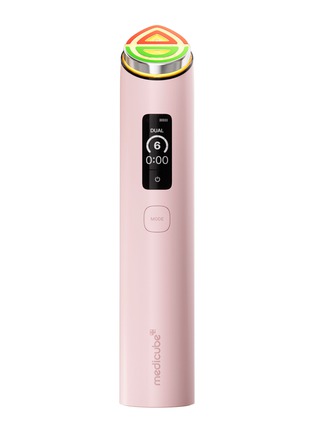
Designed for diverse skincare needs, this device delivers elevated care through 6 different modes, allowing you to tailor your routine. Experience up to 1,332% increased absorption for a radiant glow—boosting sheet masks by 9 times. It provides comprehensive volume and line improvement across the forehead, neck, and eyes, featuring 2X more powerful EMS and customizable Dual Care to target multiple concerns simultaneously.
- Device colour: Pink
- 6 Modes Available:
- Red LED: Glow boosting Booster X2 Mode
- Green LED: MC X2 Mode for plump-looking skin
- Orange LED: Derma Shot X2 Mode for skin definition care
- Yellow LED: Dual Mode that uses two modes simultaneously
- Purple LED: A mode designed to be used with a sheet mask to promote absorption
- Blue LED: Pore and exfoliation care Air Shot X2 Mode
- Rechargeable using USB-C cable provided
- Country of origin: Korea
- Press and hold the Power button for 2–3 seconds to turn on the device
- After powering on, the LCD screen will light up, a voice prompt saying “ON” will be heard, and the device will automatically start in Booster X2 mode at Level 1 intensity
- Briefly press the Mode button once to select the desired mode. Each time the Mode button is pressed, the selected mode will be displayed on the LCD screen
- When switching modes, the center LED indicator will display the corresponding LED color for each mode along with a voice prompt
- Mode Switching Sequence: Booster X2 Mode, MC X2 Mode, Derma Shot X2 Mode, Dual Mode, Mask Mode, Air Shot X2 Mode
- After selecting the mode, briefly press the Intensity button once to adjust the intensity level; each press increases the intensity by one level, and the changed intensity level will be displayed on the LCD screen
- For first-time use, always start from Level 1 intensity
- After selecting the desired mode and intensity level, use the device according to the instructions for each mode
- Please read the instructions manual for each mode carefully before use
- During use, a voice prompt will be provided every minute to remind the user of the usage time; when usage exceeds 5 minutes (or 10 minutes in Mask Mode), a voice prompt indicating the end of treatment will be provided, and the mode selection standby screen on the LCD screen will remain for 10 seconds
- If no button is pressed or the mobile application is not used within 10 seconds, the device will automatically turn off
- Button Guide:
- To switch modes, briefly press the Mode button once within 10 seconds
- To extend the treatment time, briefly press the Power button once within 10 seconds
- The default voice prompt language is English; to change the language, press and hold the Power button and Mode button simultaneously for 3 seconds
- Available languages include Chinese, English, Korean, and Japanese
- Cleaning Guide: For hygiene purposes, always clean the device head with a dry cloth or cotton pad after use and store it properly
- Charging Guide:
- To charge the device, connect the included TYPE-C charging cable to the charging port located at the bottom of the device
- During charging, the LCD screen will display the charging status with a voice prompt
- Note: Device cannot be operated while charging
此物品在配送服务范围内,并受我们的退货与退换条款所保护。物品必须符合列于服务条款及细则的「可供销售状态」。
详细资料,请参阅递送与运送以及退货与退换条款。